Which VR Productivity App is Right For Me?
Virtual Desktop vs BigScreen vs Immersed vs Spatial

Hundreds of thousands of users all around the world have discovered the secret to drastically increase their focus and productivity on a daily basis: working in VR.
“Working in VR” might sound odd to the average person today (though, everyone agrees that working in AR Glasses in the future is inevitable), but today’s data around the number of daily active users, amount of work accomplished in less time, etc., tells another story. And although there might be merit to some counterarguments, once one experiences working in VR for the first time, all doubts quickly fade away. Not once have I ever given a demo where the tester wasn’t blown away. Responses commonly are somewhere along the lines of “WOAH! I thought this was at least 5 years away!”
As more and more people come across this virtualized world, I think it’s worth highlighting what popular/effective solutions for working in VR exist today and rating them based on the specific qualities that we’ve found make people the most productive in VR: Screen(s) Practicality, Focus, Collaboration, Comfortability, and Aesthetics.
Disclaimer: This definition is subjective and based on what Immersed defines as a solid general use case for working in VR effectively.
Virtual Desktop
Virtual Desktop has been one of the top VR apps in the Oculus Store for many years. Many people know it for being able to stream SteamVR games into the Oculus Quest at a very low-latency. As a 1-man team, Guy Godin has impressed all of us with wireless gaming for sure!
“Use for Work” Rating
Screen(s) Practicality: 3/5
Focus: 5/5
Collaboration: 1/5
Comfortability: 5/5
Aesthetics: 3.5/5
Explanation: Since most of Virtual Desktop’s users are solo gamers who want really low-latency streaming with high resolution for mainly 1 screen, Virtual Desktop has optimized for a single-screen use case. Although Virtual Desktop’s screen resolution is unparalleled, it doesn’t bring an immediate need for someone to use this over their laptop if working. However, you can pan through multiple screens, on the same VR monitor if you have other monitors connected.
Virtual Desktop wasn’t optimized for work-collaboration, which is why you can’t share screens in this app. So naturally, you shouldn’t expect to have multiple screens or any work-specific workflows that you wouldn’t just have on your laptop, but text-readability is AMAZING.


BigScreen
BigScreen has also been around since the early days of the initial Oculus headset iterations. They’ve done a tremendous job at delivering high-quality movie experiences in VR. They also show 3D movies in VR like no other app has before. It’s a next-level experience, and if you haven’t tried it already, you should (way better than 3D movies in real life, where only part of your field of view is able to see the movie in 3D).
“Use for Work” Rating
Screen(s) Practicality: 3/5
Focus: 3/5
Collaboration: 4.5/5
Comfortability: 4.5/5
Aesthetics: 5/5
Explanation: Since their product was designed to mainly serve the entertainment/movie use case, they haven’t necessarily tailored the user’s overall experience toward productivity, although many have claimed to have used BigScreen to conduct meetings in VR. Although they offer a Remote Desktop feature for getting a wireless screen in VR, clarity and latency don’t seem to be its strong points just yet. I’m also personally tempted to watch movies constantly while using BigScreen (which is the point of it! haha), so it’s not the best for me to be productive in. However, using VR for work use-cases is definitely on BigScreen’s radar, and they will try their best to serve this need in the coming months/years. So, do keep your eye on them!


Immersed
Immersed has been in development for a few years now, and has been publicly available for download the past 2 years. From the beginning, the intended use-case for Immersed was specifically for working long hours in VR solo and with a team (when needed).
“Use for Work” Rating
Screen(s) Practicality: 5/5
Focus: 5/5
Collaboration: 4.5/5
Comfortability: 5/5
Aesthetics: 3/5
Explanation: Users have up to 5 high-quality, low-latency virtual monitors with no additional hardware which they can resize and move around freely in your distraction-free workspace. They can also share monitors with 4+ users in the same space as well. The environments have been optimized for getting into a work-rhythm, increasing comfortability. Onboarding is very smooth, and the overall aesthetics have been getting a complete makeover, which has improved and is continuing to get better with time. With users who spend 40–50hrs each week in Immersed, it has proven to become a very comfortable app for power-users.

Spatial
Like Immersed, Spatial is newer to the VR scene. They’ve landed some pretty impressive partnerships with companies like Mattel (toy-maker) and raised a lot of funding. Spatial is great for getting realistic avatars into the same space (telepresence) and observing 3D models on several different platforms.
“Use for Work” Rating
Screen(s) Practicality: 2/5
Focus: 4/5
Collaboration: 4/5
Comfortability: 4/5
Aesthetics: 4/5
Explanation: The screen-sharing capability currently allows one screen per user via in-browser sharing, but text isn’t very easy to read unless you move the monitor an inch or two from your face. Then again, this doesn’t seem to be their main use-case, so it makes sense that their time/focus hasn’t been spent in this area. However, the app is actually pretty aesthetically-pleasing and I could see 3D asset-building teams getting a lot of value in collaborating in a product like this that has sticky-notes in VR too. Their cross-platform capabilities are also where they shine the brightest, which is why Collaboration was rated so high.

Overall Scores (Summary)
When tallying up all the scores, here are the results:
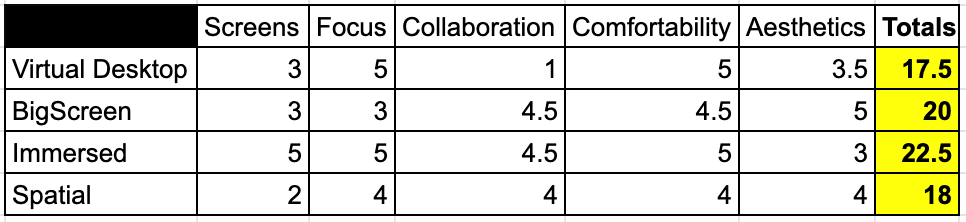
Immersed was created from the start with the “working individual” in mind. We didn’t start with telepresence. We didn’t start with entertainment. We started by making sure a user could work comfortably in VR with all of their screens for hours on end, and then once it’s time to collaborate, other users could easily join them (much like the real world).
Now that millions of people around the world are having to work from home because of COVID, Immersed is proud to partner with Oculus to bring VR to the masses to help them work remotely more effectively.